ferrislucas/iterm-mcp
iTerm'e erişim sağlayan bir Model Context Protocol sunucusu. Terminal penceresinde çalıştırdığınız komutları yönetebilir ve gördüğünüz çıktılar hakkında sorular sorabilirsiniz.
Claude Desktop config.json'a ekle
{
  "mcpServers": {
    "ferrislucas-iterm-mcp": {
      "command": "node",
      "args": [
        "~/.mcp/iterm-mcp/index.js"
      ]
    }
  }
}
Kaynak kodu al ve yerel olarak çalıştır
git clone https://github.com/ferrislucas/iterm-mcp.git ~/.mcp/iterm-mcp
cd ~/.mcp/iterm-mcp
Bu MCP sunucusu hakkında
iterm-mcp
iTerm oturumunuza erişim sağlayan bir Model Context Protocol sunucusu.
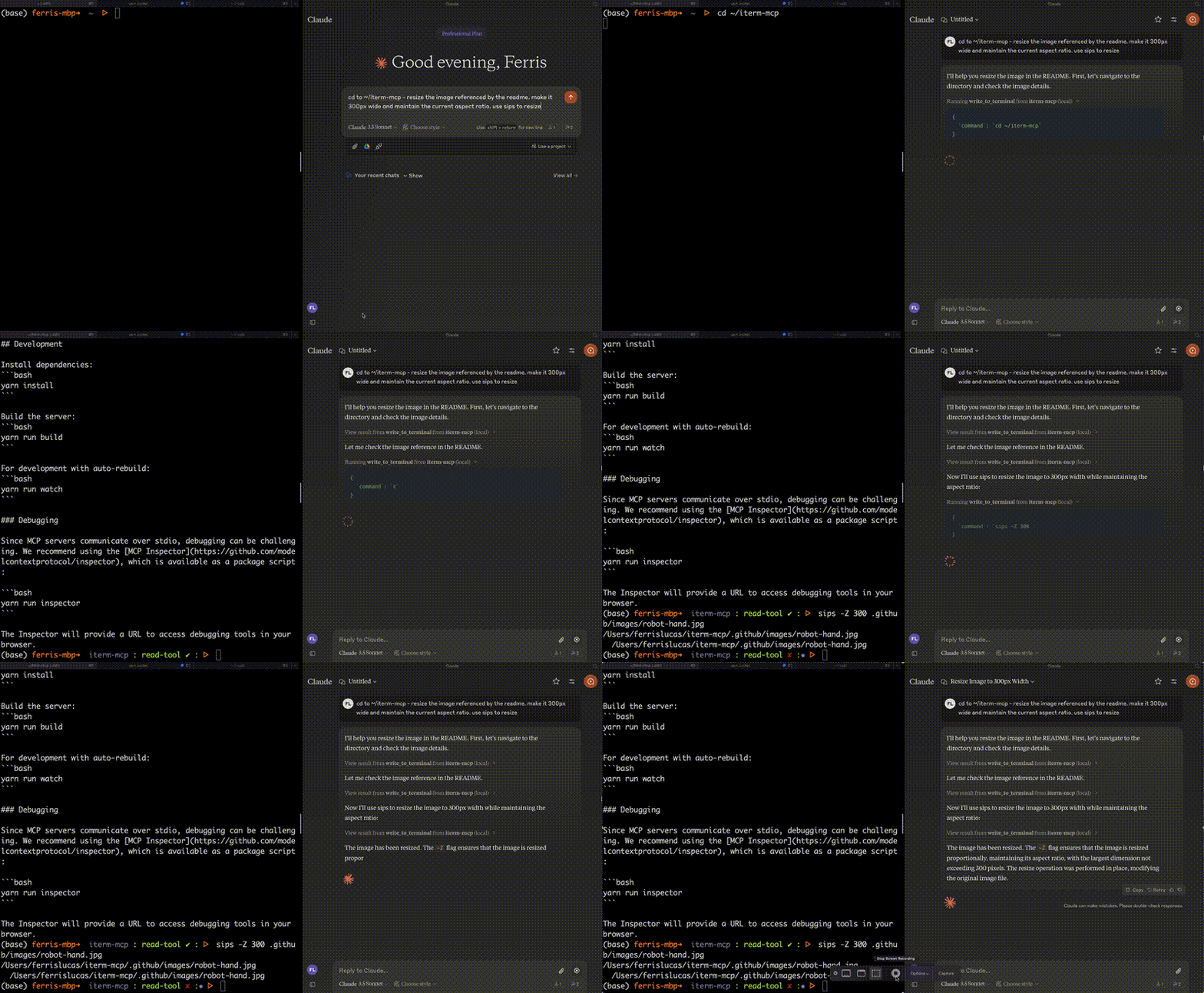
Özellikler
Verimli Token Kullanımı: iterm-mcp, modele yalnızca ilgilendiği çıktıyı inceleme yeteneği verir. Model, uzun süredir çalışan komutlar için bile genellikle yalnızca çıktının son birkaç satırını görmek ister.
Doğal Entegrasyon: iTerm'i model ile paylaşırsınız. Ekranda neler olduğu hakkında sorular sorabilir veya modele bir görevi devredebilir ve her adımı gerçekleştirirken izleyebilirsiniz.
Tam Terminal Kontrolü ve REPL Desteği: Model, REPL'lerle başlatabilir ve etkileşim kurabileceği gibi ctrl-c, ctrl-z gibi kontrol karakterlerini gönderebilir.
Bağımlılıklara Dikkat Eder: iterm-mcp minimal bağımlılıklarla oluşturulmuştur ve npx üzerinden çalıştırılabilir. Claude Desktop ve diğer MCP istemcilerine eklenmesi kolay olacak şekilde tasarlanmıştır. Hiçbir sorun olmadan çalışmalıdır.
Güvenlik Hususları
- Aracı güvenli şekilde kullanmak kullanıcının sorumluluğundadır.
- Yerleşik kısıtlama yoktur: iterm-mcp, yürütülen komutların güvenliğini değerlendirmeye çalışmaz.
- Modeller beklenmedik şekillerde davranabilir. Kullanıcının aktiviteyi izlemesi ve uygun olduğunda iptal etmesi beklenir.
- Çok adımlı görevler için, model hatalı bir yola giderse onu durdurmanız gerekebilir. Modelin davranışını tanıyana kadar daha küçük, odaklanmış görevlerle başlayın.
Araçlar
write_to_terminal- Aktif iTerm terminaline yazar, genellikle bir komutu çalıştırmak için kullanılır. Komut tarafından üretilen çıktı satırlarının sayısını döndürür.read_terminal_output- Aktif iTerm terminalinden istenen sayıda satırı okur.send_control_character- Aktif iTerm terminaline bir kontrol karakteri gönderir.
Gereksinimler
- iTerm2 çalışıyor olmalı
- Node sürümü 18 veya daha büyük
Kurulum
Claude Desktop ile kullanmak için sunucu konfigürasyonunu ekleyin:
macOS'ta: ~/Library/Application Support/Claude/claude_desktop_config.json
Windows'ta: %APPDATA%/Claude/claude_desktop_config.json
{
  "mcpServers": {
    "iterm-mcp": {
      "command": "npx",
      "args": [
        "-y",
        "iterm-mcp"
      ]
    }
  }
}
Smithery Aracılığıyla Kurulum
iTerm'i Claude Desktop için otomatik olarak Smithery aracılığıyla kurmak için:
npx -y @smithery/cli install iterm-mcp --client claude
Geliştirme
Bağımlılıkları yükleyin:
yarn install
Sunucuyu derleyin:
yarn run build
Otomatik yeniden derleme ile geliştirme için:
yarn run watch
Hata Ayıklama
MCP sunucuları stdio üzerinden iletişim kurduğundan, hata ayıklama zorlayıcı olabilir. Paket betiği olarak mevcut olan MCP Inspector kullanmanızı öneriyoruz:
yarn run inspector
yarn debug <command>
Inspector, tarayıcınızda hata ayıklama araçlarına erişmek için bir URL sağlayacaktır.
Benzer MCP sunucuları
Her türlü programı yönetip çalıştırabilen, code ve metin dosyalarını okuyup yazabilen, arayabilen ve düzenleyebilen multi-purpose bir araç.
Intlayer i18n / CMS aracı için yapay zeka destekli yardım ile IDE'nizi geliştiren bir MCP Server: akıllı CLI erişimi, dokümantasyona anında ulaşım.
MCP sunucusu, Model Context Protocol üzerinden Linux ve Windows sunucuları için SSH kontrolü sağlar. Parola veya SSH anahtarı ile uzak shell komutlarını güvenli bir şekilde çalıştırabilirsiniz.
run_command ve run_script araçlarıyla herhangi bir komutu çalıştırabilirsiniz.
Model Context Protocol (MCP) uygulayan, güvenli shell komut yürütme sunucusu.
Güvenli yürütme ve özelleştirilebilir güvenlik politikaları ile komut satırı arayüzü.