suekou/mcp-notion-server
Notion API ile etkileşim kurmak
Claude Desktop config.json'a ekle
{
  "mcpServers": {
    "suekou-mcp-notion-server": {
      "command": "node",
      "args": [
        "~/.mcp/mcp-notion-server/index.js"
      ]
    }
  }
}
Kaynak kodu al ve yerel olarak çalıştır
git clone https://github.com/suekou/mcp-notion-server.git ~/.mcp/mcp-notion-server
cd ~/.mcp/mcp-notion-server
Bu MCP sunucusu hakkında
Notion MCP Server
Notion API için AI dostu MCP sunucusu. Ajanların Notion çalışma alanlarını bulmasına, okumasına, sorgulamasına ve güncellemesine yardımcı olurken yanıtları günlük AI iş akışları için yeterince kompakt tutar.
Bu sunucu Notion API 2026-03-11 sürümünü hedefler ve mevcut veritabanı/veri kaynağı modelini kullanır. MCP araçlarını, istemlerini, kaynakları, yapılandırılmış araç sonuçlarını ve etkileşimli Notion iş akışları için isteğe bağlı MCP Apps'ı sunar.
Öne Çıkanlar
notion_findile arama ve hedef keşfi.notion_read_pagearacılığıyla kararlı blok kimliklerine sahip kompakt sayfa okuma.notion_inspect_data_sourceile veri kaynağı şeması inceleme.- Şema farkında veri kaynağı sorgulama ve basit değerlerle öğe oluşturma.
- Paragraflar, başlıklar, listeler, yapılacaklar, alıntılar, belirtiler, kod blokları, ayırıcılar ve güvenli Markdown ekleme için basit sayfa düzenleme araçları.
- Gelişmiş blok, sayfa, veritabanı, veri kaynağı, yorum ve kullanıcı işlemleri için ham Notion API araçları.
- İsteğe bağlı MCP Apps: Veri Kaynağı Gezgini ve Sayfa Workbench'i.
Hızlı Başlangıç
Bu sunucuyu Claude Desktop gibi bir MCP ana bilgisayarına ekleyin:
{
  "mcpServers": {
    "notion": {
      "command": "npx",
      "args": ["-y", "@suekou/mcp-notion-server"],
      "env": {
        "NOTION_API_TOKEN": "your-integration-token"
      }
    }
  }
}
Yapılandırmayı kaydettikten sonra MCP ana bilgisayarınızı yeniden başlatın.
Kurulum Kılavuzu
1. Notion entegrasyonu oluşturun
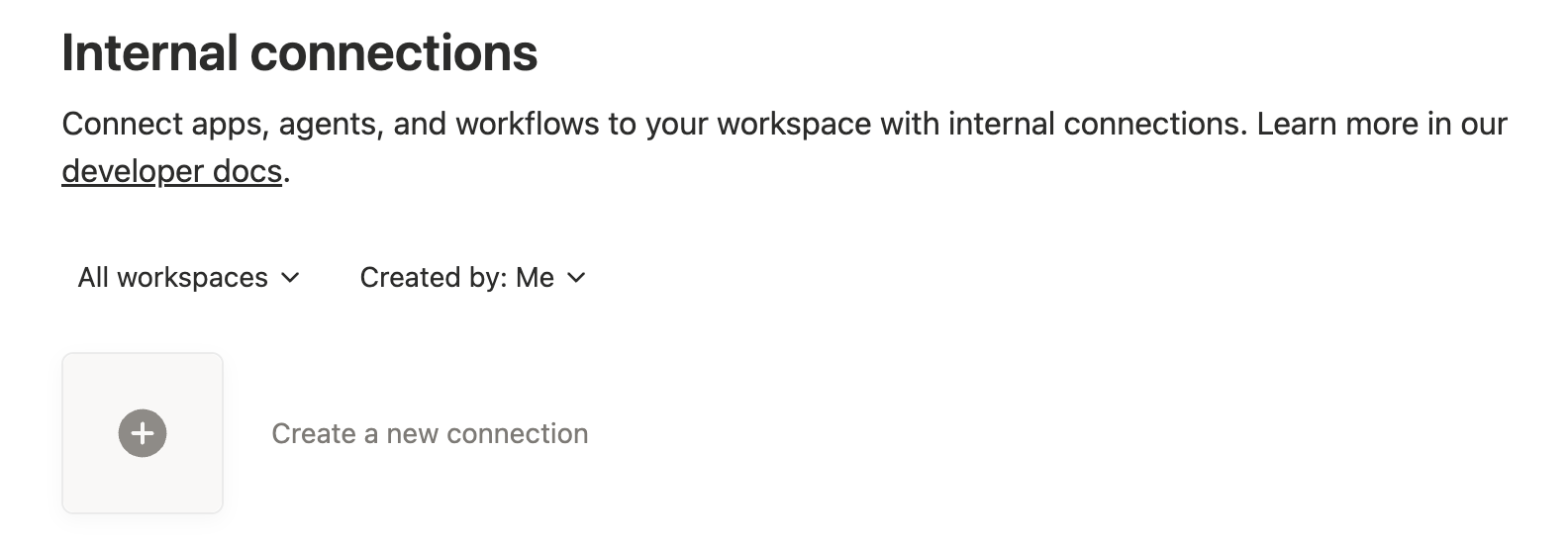
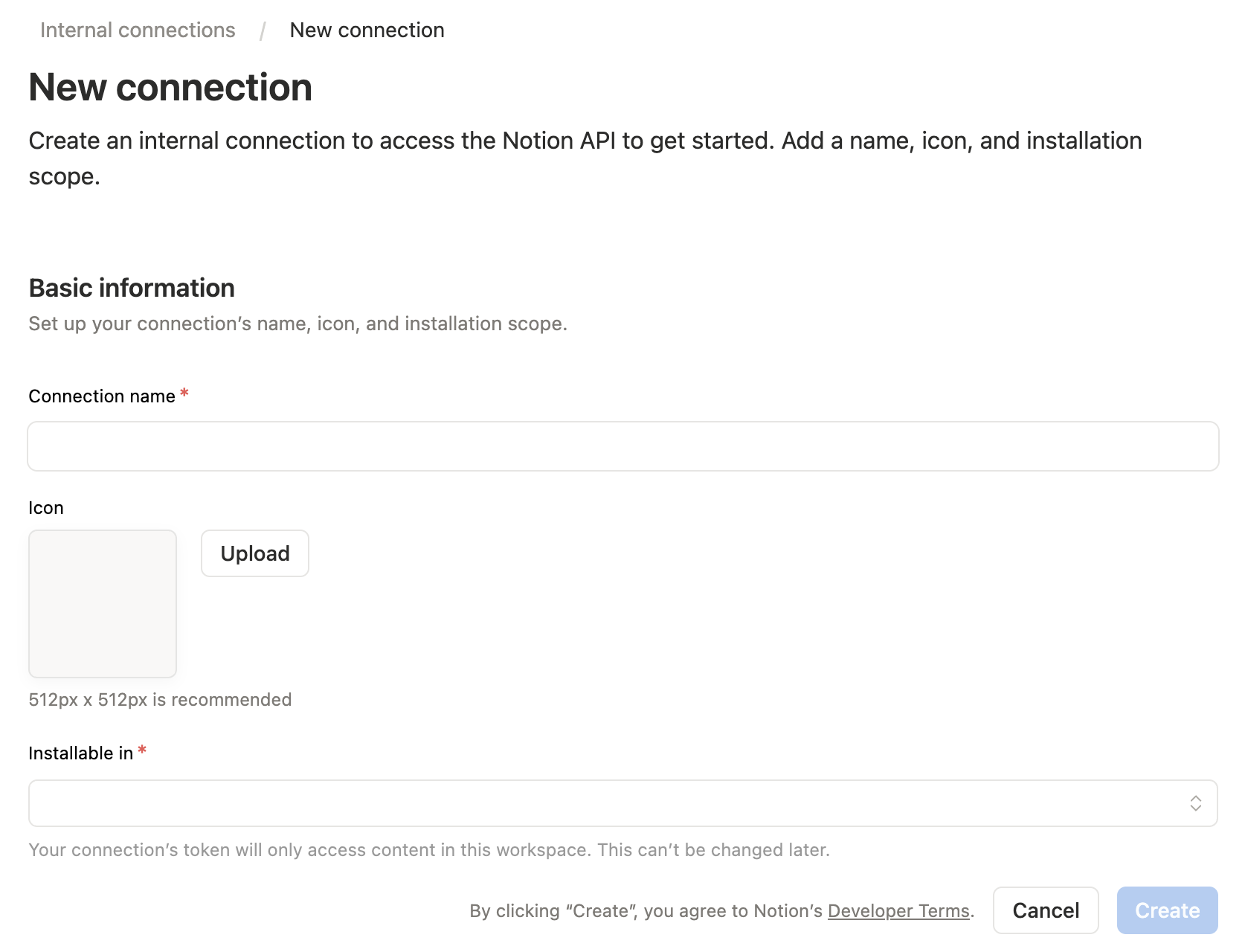
Notion entegrasyonları panosunu açın, ardından yeni bir dahili entegrasyon oluşturun.
2. Yetenekleri yapılandırın
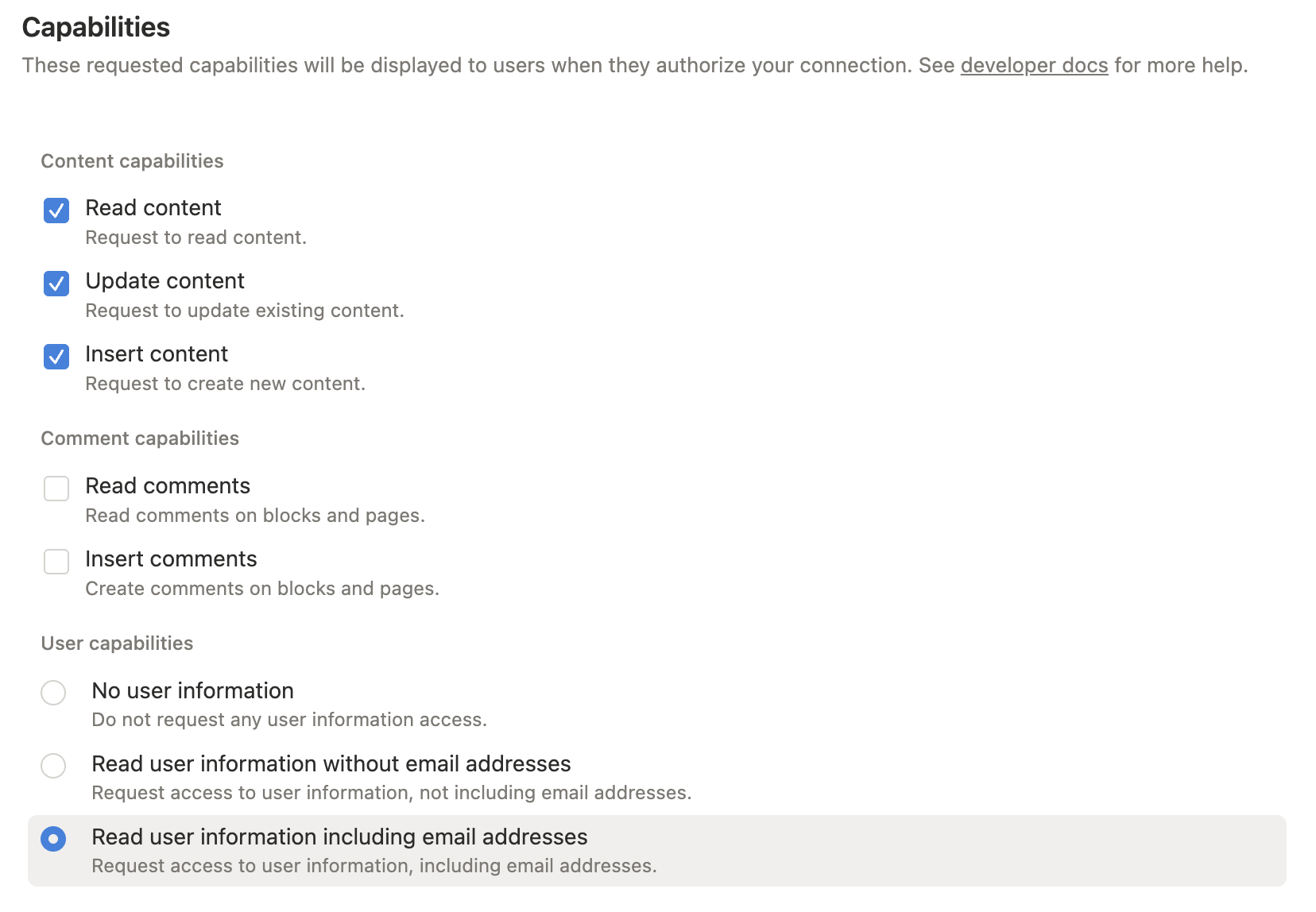
Yalnızca ihtiyacınız olan yetenekleri verin:
- İçerik oku: arama, sayfa okuma, veri kaynağı alma ve sorgular için gerekli.
- İçerik ekle: sayfalar/öğeler oluşturma ve blok ekleme için gerekli.
- İçerik güncelle: sayfaları, blokları ve veri kaynağı şemalarını güncellemek için gerekli.
- Yorum oku / Yorum ekle: yalnızca yorum araçları kullanırken gerekli.
- Kullanıcı bilgileri: yalnızca kullanıcı arama araçları kullanırken gerekli.
Kurulum sırasında tam işlevsellik için okuma, ekleme ve içeriği güncelleme yetkisini etkinleştirin. Yorum veya kullanıcı yeteneklerini yalnızca bu araçları kullanmayı planlıyorsanız ekleyin.
3. İçerik erişimi verin
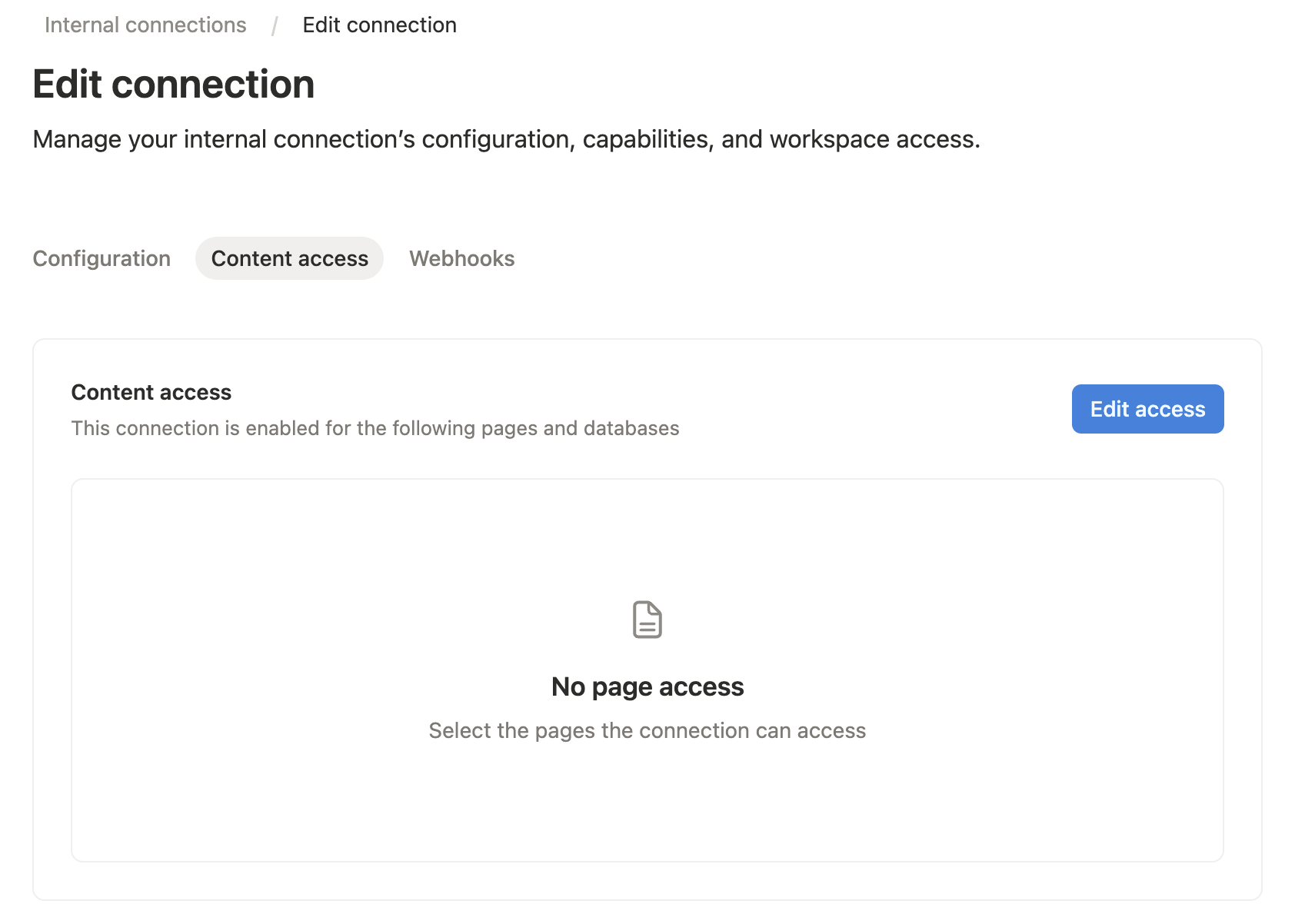
Entegrasyonunuzun Content access sekmesini açın, ardından MCP sunucusunun okumak veya düzenlemek istediği sayfaları veya veritabanlarını seçin.
Hedef Notion sayfası veya veritabanından da erişim verebilirsiniz: ... menüsünü açın, Connections seçeneğini seçin, ardından entegrasyonunuzu ekleyin.
Notion yalnızca bir entegrasyonun kendisiyle paylaşılan sayfalar ve veritabanlarına erişmesine izin verir. Bir sayfaya eklenen bir bağlantı, o sayfanın alt öğelerine de erişebilir.
4. Dahili entegrasyon tokenını kopyalayın
Entegrasyon gizliliğini kopyalayın. Bu değer MCP ana bilgisayar yapılandırmanızda NOTION_API_TOKEN olur.

5. MCP ana bilgisayarınızı yapılandırın
Cursor, Claude Desktop ve diğer MCP ana bilgisayarları için bu sunucu yapılandırmasını MCP ayarlarınıza ekleyin:
{
  "mcpServers": {
    "notion": {
      "command": "npx",
      "args": ["-y", "@suekou/mcp-notion-server"],
      "env": {
        "NOTION_API_TOKEN": "secret_xxxxxxxxxxxxxxxxxxxxxxxxxxxxxxxxxxxxxxxxxxx"
      }
    }
  }
}
Yerel olarak inşa edilmiş bir checkout için:
{
  "mcpServers": {
    "notion": {
      "command": "node",
      "args": ["/absolute/path/to/suekou-mcp-notion-server/build/index.js"],
      "env": {
        "NOTION_API_TOKEN": "secret_xxxxxxxxxxxxxxxxxxxxxxxxxxxxxxxxxxxxxxxxxxx"
      }
    }
  }
}
Önerilen İş Akışı
- Bir sayfayı veya veri kaynağını bulunması için
notion_findkullanın. - Sayfa bağlamı ve düzenlenebilir blok kimliklerinin için
notion_read_pagekullanın. - Veri kaynağını sorgulamadan veya öğeler oluşturmadan önce
notion_inspect_data_sourcekullanın. - Yaygın veri kaynağı çalışmaları için
notion_query_data_source_by_valuesvenotion_create_data_source_item_from_valueskullanın. - Normal sayfa düzenlemeleri için
notion_append_markdown,notion_append_content,notion_update_contentveyanotion_update_content_batchkullanın. - Basitleştirilmiş araçlar ihtiyacınız olan Notion API şeklini kapsamadığında yalnızca ham JSON araçlarına geri dönün.
Geliştiriciler İçin
Bu referanslar esas olarak geliştirme, özelleştirme ve gelişmiş MCP iş akışları içindir:
- Configuration: ortam değişkenleri, komut satırı argümanları, MCP ana bilgisayar örnekleri, geliştirme komutları ve sorun giderme.
- Tools: iş akışı alanına göre gruplandırılmış eksiksiz araç referansı.
- Workflows: pratik okuma, yazma, veri kaynağı, geçiş ve hata işleme rehberi.
- MCP Apps: etkileşimli Veri Kaynağı Gezgini ve Sayfa Workbench ayrıntıları.
Geliştirme
Bu proje Node.js 22 veya daha yeni ve pnpm kullanır.
pnpm install --frozen-lockfile
pnpm run build
pnpm test
Yerel geliştirme sırasında MCP inspektörünü kullanın:
pnpm run inspector
Lisans
Bu MCP sunucusu MIT Lisansı altında lisanslanmıştır. Bu, MIT Lisansının şartlarına ve koşullarına tabi olarak yazılımı serbestçe kullanma, değiştirme ve dağıtma haqqınız olduğu anlamına gelir. Daha fazla ayrıntı için lütfen proje deposundaki LICENSE dosyasına bakın.
Benzer MCP sunucuları
Tüm MCP protokol özelliklerini kullanan MCP sunucusu.
Python'da MCP sunucuları oluşturmak için üst düzey bir framework.
Ekran ve ses kaydını zaman damgasıyla indeksleyen, SQL/embedding storage kullanan, semantic search ve LLM tabanlı geçmiş analizi yapan local-first sistem. NextJS plugin ekosistemi aracılığıyla bağlam farkında AI ajanlar oluşturmayı ve event-triggered aksiyonları destekler.
YouTube video bilgilerini çıkartıp dönüştürün.
Obsidian ile REST API aracılığıyla etkileşim kurma
AI ajanlarını 600+ entegrasyon ile tek bir arayüzden bağlayın - OAuth, scaling ve monitoring dahil