kubestellar/console
Multi-cluster Kubernetes dashboard with built-in MCP server (kc-agent) for AI-assisted operations, real-time observability, and integrations with 20+ CNCF projects across edge and cloud clusters.
Claude Desktop config.json'a ekle
{
  "mcpServers": {
    "kubestellar-console": {
      "command": "node",
      "args": [
        "~/.mcp/console/index.js"
      ]
    }
  }
}
Kaynak kodu al ve yerel olarak çalıştır
git clone https://github.com/kubestellar/console.git ~/.mcp/console
cd ~/.mcp/console
Bu MCP sunucusu hakkında
KubeStellar Console


AI-powered multi-cluster Kubernetes dashboard with guided install missions for 250+ CNCF projects.
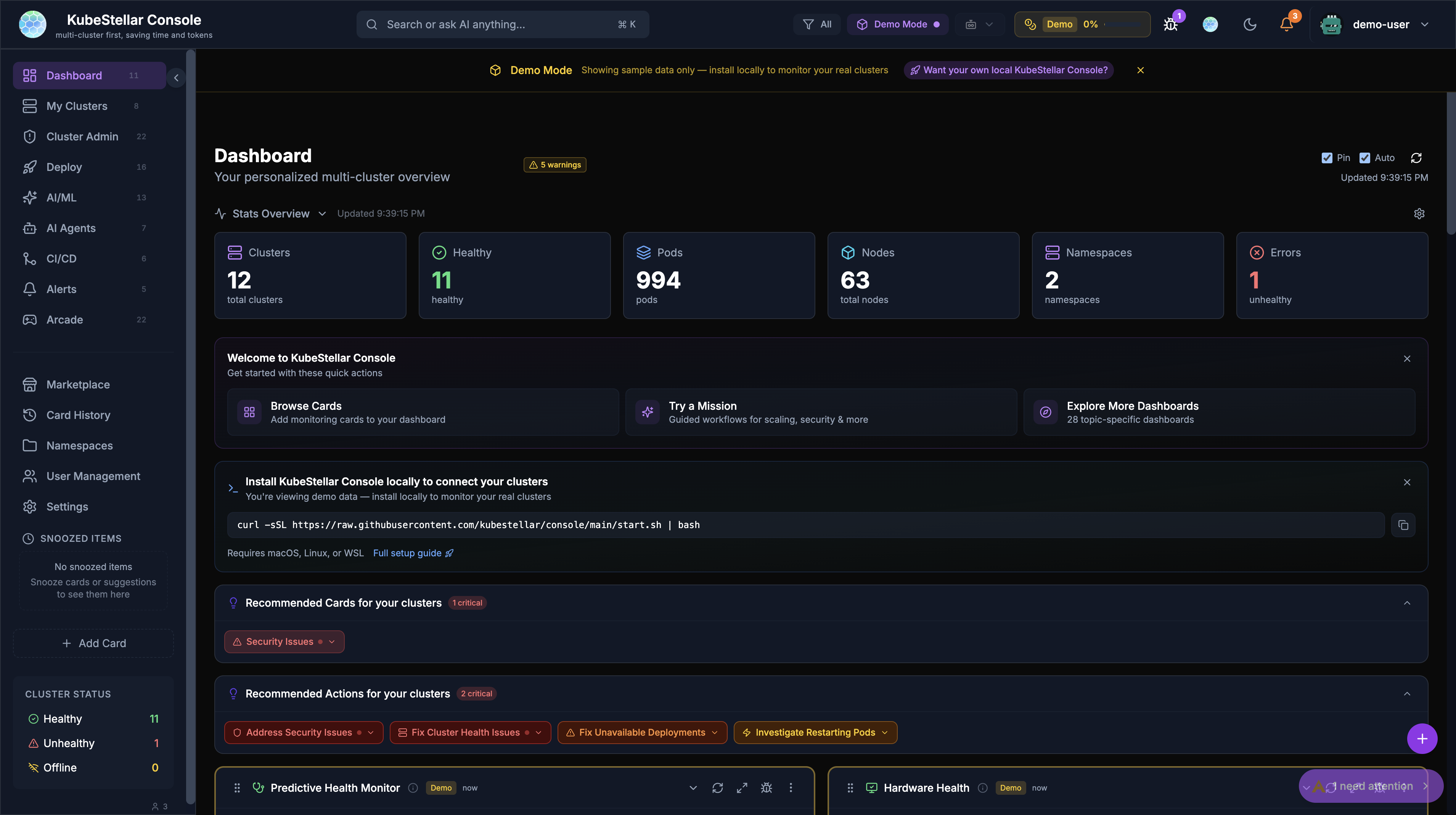
Try it now (no install)
The fastest way to evaluate the console is the hosted version — no Kubernetes cluster, no install, no configuration. Demo data is built in:
The hosted demo is a self-contained showcase: it serves canned demo data and intentionally does not talk to a local agent (LOCAL_AGENT_HTTP_URL is disabled in the Netlify build, so the browser cannot reach a kc-agent on your laptop). Use it to explore the UI, browse missions, and test cards without touching your machine. To work against your own clusters or use AI features with your own keys, you need to self-host the console — see the next section.
Which path do I need?
| I want to… | What to do | Need a cluster? | Need to install anything? |
|---|---|---|---|
| Explore the UI / evaluate the product | console.kubestellar.io | no | no |
| Connect the console to my own clusters | Self-host the console and install kc-agent on the same machine | yes | yes (curl + kc-agent) |
| Self-host the console (air-gapped, custom OAuth, etc.) | Local install | optional | yes |
| Run the console inside a cluster | deploy.sh | yes | Helm-style script |
Note:
kc-agentis not consumed by the hosted demo at console.kubestellar.io. It bridges your self-hosted console (running atlocalhost:8080) to your kubeconfig contexts and to AI providers. If you want the convenience of the hosted UI plus your real cluster data, you currently have to run the console locally.
Local install (self-host)
The quickest path to a working console with your own data. start.sh downloads the pre-built console binary and a pre-built kc-agent, starts both, and opens http://localhost:8080:
curl -sSL https://raw.githubusercontent.com/kubestellar/console/main/start.sh | bashDeploy into a cluster instead with deploy.sh (--openshift, --ingress <host>, --github-oauth, --uninstall). See docs/deploy.md for the full flag, environment-variable, exit-code, and example reference. For Helm chart installs that should talk to an in-cluster Kagenti backend, see Connecting Kagenti and the Kagenti deployment guide for controller/agent topology, setup steps, and troubleshooting.
Development
If you want to work on the repo itself, start with these entry points:
- CLAUDE.md — canonical developer guide for repo structure, testing expectations, and agent rules
- CONTRIBUTING.md — contribution workflow, issue/PR conventions, and inventory notes
- docs/README.md — index of the documentation tree, grouped by audience
kc-agent (bridge self-hosted console to your clusters)
kc-agent is a small local HTTP/WS daemon that the self-hosted console talks to (default http://127.0.0.1:8585). It forwards requests from the browser to your kubeconfig contexts and to AI providers. The hosted demo at console.kubestellar.io cannot reach it (#6195) — kc-agent is only useful when you self-host.
You do not need kc-agent if you only want to browse the UI / demo data — just use the hosted demo. start.sh already installs and launches a pre-built kc-agent for you, so most users never need to install it manually. The instructions below are for development builds or platforms without a Homebrew formula:
Prerequisites for kc-agent:
- A kubeconfig that points at one or more reachable clusters (
kubectl get nodesworks locally) - macOS, Linux, or Windows with WSL2 (see Windows section)
# macOS — Homebrew formula (pre-built)
brew tap kubestellar/tap && brew install kc-agent

# Linux / from source — requires Go 1.26.4+ (matches go.mod)
mkdir -p bin
go build -o bin/kc-agent ./cmd/kc-agent && ./bin/kc-agent
kc-agent authentication (KC_AGENT_TOKEN)
kc-agent accepts a shared secret via KC_AGENT_TOKEN. When it is set, browser and WebSocket requests to the agent must present Authorization: Bearer <token> (or ?token=<token> for a real WebSocket upgrade). This is recommended when you want an extra layer of protection against other local processes reaching 127.0.0.1:8585.
start-dev.shandstartup-oauth.shauto-generate a randomKC_AGENT_TOKENfor each session if you do not set one.- Set
KC_AGENT_TOKENyourself if you want a stable secret across restarts or if you launchkc-agentmanually. - Generate one with
openssl rand -hex 32.
export KC_AGENT_TOKEN="$(openssl rand -hex 32)"
./bin/kc-agent
When both the self-hosted console and kc-agent are running, open http://localhost:8080 and your local clusters appear in the cluster picker.
Windows (WSL2)
The console install scripts and kc-agent are POSIX shell + Go, so they run unchanged inside WSL2. Native Windows (PowerShell / CMD) is not supported — install WSL2 with Ubuntu and run everything from the WSL shell:
# In PowerShell — one-time setup
wsl --install -d Ubuntu
Then from inside the Ubuntu/WSL shell. start.sh only needs curl — it downloads pre-built binaries, no Go toolchain required:
# Prerequisite: just curl
sudo apt-get update && sudo apt-get install -y curl

# Same install command as macOS / Linux
curl -sSL https://raw.githubusercontent.com/kubestellar/console/main/start.sh | bash
⚠️ Windows PowerShell
curlgotcha: In PowerShell,curlis an alias forInvoke-WebRequest, which behaves completely differently from the real curl. If you need to test endpoints from PowerShell (outside WSL), always usecurl.exeinstead ofcurl, or use the native PowerShell cmdlet:# Option 1 — use curl.exe (the real curl shipped with Windows 10+) curl.exe -s http://localhost:8080/health # Option 2 — use PowerShell native cmdlet Invoke-RestMethod http://localhost:8080/health
Building kc-agent from source is a separate path — only needed if you want a development build of the agent rather than the prebuilt binary that start.sh already installs. It requires Go 1.26.4+ (the version pinned in go.mod) and git. Ubuntu’s golang-go package usually lags the current release; use the official Go install or the longsleep/golang-backports PPA to get a recent version:
# add-apt-repository lives in software-properties-common — install it
# first on minimal Ubuntu/WSL images that don't ship with it.
sudo apt-get update && sudo apt-get install -y software-properties-common
sudo add-apt-repository -y ppa:longsleep/golang-backports
sudo apt-get update && sudo apt-get install -y golang-1.26 git
git clone https://github.com/kubestellar/console.git
cd console
mkdir -p bin
go build -o bin/kc-agent ./cmd/kc-agent && ./bin/kc-agent
Open http://localhost:8080 in your Windows browser — WSL2 forwards localhost automatically. Tracked by #6185.
GitHub authentication
The console uses two GitHub credentials (#6190). Most users need neither — the hosted demo works without any GitHub auth at all.
| Credential | What it does | When you need it |
|---|---|---|
GitHub OAuth App (GITHUB_CLIENT_ID + GITHUB_CLIENT_SECRET) | Sign-in for the self-hosted console at localhost:8080 | Only if you self-host the console AND want user sign-in. Skip for the hosted demo. |
Consolidated GitHub PAT (a.k.a. FeedbackGitHubToken) | Same single PAT powers everything: nightly E2E status, community activity, leaderboard widgets, and the /issue page that opens GitHub issues | Optional. Without it, /issue returns 503 Issue submission is not available and the GitHub-powered dashboard widgets fall back to demo data. |
Minimum to get started: nothing — hit console.kubestellar.io. Everything above is opt-in.
Setting the consolidated PAT
There are two equivalent ways to supply this PAT — pick one. Both write to the same field (FeedbackGitHubToken in pkg/api/handlers/feedback.go and pkg/api/handlers/github_proxy.go), so you don’t need to set both:
-
.envfile at the repo root — set on startup, no UI step needed:FEEDBACK_GITHUB_TOKEN=ghp_… -
Settings UI (self-hosted only, admin role required) — visit Settings → GitHub Token → paste. The UI POSTs to
/api/github/token, which is gated on the consoleadminrole and persisted to~/.kc/settings.jsonby the backend. On a fresh self-hosted install, the first authenticated user is auto-bootstrapped to admin so local instances are not locked out of settings.
The hosted Netlify demo cannot persist a PAT — it has no writable local backend — so Settings UI saves don’t work there. Use the env-var path for self-hosting.
Setting up GitHub OAuth (self-hosted only)
If you self-host the console and want sign-in:
-
Create a GitHub OAuth App
- Homepage URL:
http://localhost:8080 - Callback URL:
http://localhost:8080/auth/github/callback - After creating the app, note down your Client ID (visible immediately) and generate a Client Secret (click “Generate a new client secret”)
- Homepage URL:
-
Clone the repo (if you haven’t already):
git clone https://github.com/kubestellar/console.git cd console -
Create a
.envfile in the repo root (console/.env):# Create .env file with your GitHub OAuth App credentials cat > .env << 'EOF' GITHUB_CLIENT_ID=your-client-id-here GITHUB_CLIENT_SECRET=your-client-secret-here EOFReplace
your-client-id-hereandyour-client-secret-herewith the actual values from your GitHub OAuth App (step 1).⚠️ Common mistakes:
- Missing
.envfile: The console looks for.envin the repo root (console/.env), not in your home directory or elsewhere. - Wrong credentials: Client ID and Client Secret must match exactly what GitHub shows in your OAuth App settings. Copy-paste to avoid typos.
- Expired secret: If you regenerate the Client Secret in GitHub, you must update
.envwith the new value.
Troubleshooting OAuth errors:
"invalid client credentials"→ VerifyGITHUB_CLIENT_IDandGITHUB_CLIENT_SECRETin your.envmatch your GitHub OAuth App at https://github.com/settings/developers"redirect_uri_mismatch"→ The Callback URL in your GitHub OAuth App must be exactlyhttp://localhost:8080/auth/github/callback
- Missing
-
Start the console:
./startup-oauth.sh
Open http://localhost:8080 and sign in with GitHub. For Kubernetes deployments, pass --github-oauth to deploy.sh instead.
Consolidated PAT scopes
Whichever path you used above (env var or Settings UI), the Personal Access Token needs either:
- A classic PAT with the
reposcope, or - A fine-grained PAT with both Issues: Read & Write and Contents: Read & Write (verified against
pkg/api/handlers/feedback.go:71— Contents is required, not just Issues).
AI configuration
The console can use AI for adaptive card suggestions and mission help. AI is optional — the UI, missions, and dashboards all work without any AI keys configured (#6191).
Important: AI BYOK only works on the self-hosted console. The hosted demo at console.kubestellar.io explicitly disables LOCAL_AGENT_HTTP_URL (verified in web/src/lib/constants/network.ts), so the browser cannot reach a local agent there. To use your own AI keys, self-host the console first.
Supported kc-agent providers (CLI-based and operator-controlled LLMs)
kc-agent uses local CLI providers and operator-controlled OpenAI-compatible / self-hosted LLMs for AI features that need cluster-aware tool execution. Raw vendor API keys such as ANTHROPIC_API_KEY, OPENAI_API_KEY, and GOOGLE_API_KEY do not make Anthropic/OpenAI/Gemini available as mission-capable kc-agent providers in the current build. Those variables are documented later for backend/Stellar paths and source-level provider configuration, while kc-agent itself still relies on the tooling model described in docs/security/SECURITY-MODEL.md.
Recommended setup paths:
-
CLI-based agents (with full tool execution capabilities):
# Install Claude Desktop or claude CLI — https://claude.ai/download # Install Gemini CLI — follow official Google AI SDK instructions # Install GitHub Copilot CLI — gh extension install github/gh-copilot # Install other CLI agents: codex, antigravity, goose, bob # kc-agent will auto-detect installed CLI agents — no env vars needed ./bin/kc-agent -
Local/self-hosted LLM servers (OpenAI-compatible endpoints):
# Ollama (local)
export OLLAMA_URL=http://127.0.0.1:11434
export OLLAMA_MODEL=llama3.2

# Open WebUI (self-hosted gateway)
export OPEN_WEBUI_URL=https://your-openwebui.example.com
export OPEN_WEBUI_API_KEY=your-key
export OPEN_WEBUI_MODEL=gpt-4

# Other supported: llama.cpp, LocalAI, vLLM, LM Studio, Red Hat AI Inference Server
# See docs/security/SECURITY-MODEL.md for the full list

./bin/kc-agent
Why are Anthropic/OpenAI/Gemini API keys not enough for
kc-agent? The agent registry intentionally excludes those upstream API-key providers because they cannot execute cluster commands AND they route traffic to a specific vendor endpoint that the operator has no control over. The console’s mission and diagnostic flows require tool-capable agents that can runkubectl,helm, and other commands locally. Seepkg/agent/registry.go:378-384for the rationale.
What do the README API-key variables enable?
ANTHROPIC_API_KEY,OPENAI_API_KEY, andGOOGLE_API_KEYare relevant to backend/Stellar provider configuration and source-level HTTP-provider support, whileGROQ_API_KEYandOPENROUTER_API_KEYenable registered chat-only providers. None of those variables replace the CLI-based setup above when you needkc-agentmissions or other tool-executing workflows.
A note on the Settings → API Keys modal: The console UI exposes a “Manage Keys” button under Settings → API Keys. This modal is wired to the agent’s
/settings/keysendpoint, but in the current build that endpoint returns an empty providers list (providers := []providerDef{}inpkg/agent/server_operations.go:288) because API-key-driven agents are hidden there. Use the CLI-based or local LLM setup paths above forkc-agentfeatures.
If no supported AI provider is configured, AI-powered features fall back to deterministic / rule-based behavior. The card suggestions, missions, and dashboards remain fully usable.
Security model, air-gapped deployments, and local / self-hosted LLMs are covered in docs/security/SECURITY-MODEL.md. That document explains the data flow between browser, Go backend, kc-agent, and AI providers; how to run the console with no external AI access; and the currently supported self-hosted path using kc-agent’s CLI-based agents.
How It Works
- Onboarding — Sign in with GitHub, answer role questions, get a personalized dashboard
- Adaptive AI — Tracks card interactions and suggests swaps when your focus shifts (Claude, OpenAI, or Gemini)
- MCP Bridge — Queries cluster state (pods, deployments, events, drift, security) via
kubestellar-opsandkubestellar-deploy - Missions — Step-by-step guided installs with pre-flight checks, validation, troubleshooting, and rollback
- Real-time — WebSocket-powered live event streaming from all connected clusters
Stellar (Persistent AI Operations Runtime — Alpha)
Stellar extends the console from request/response AI interactions into a persistent operational runtime with mission continuity, memory, and proactive execution. It brings autonomous operations capabilities to KubeStellar with support for multi-step mission planning, long-term memory, event-driven triggers, and policy-enforced tool execution.
Key capabilities:
- Persistent missions — Store and re-run multi-step operational tasks (rollouts, incident response, scaling decisions)
- Operational memory — Learn from incidents, postmortems, and rollout history
- Event-driven triggers — Respond to Kubernetes events, Prometheus alerts, webhooks, or schedules
- RBAC-aware execution — Tool runtime validates permissions before cluster actions
- Structured auditing — Full audit trail of prompts, decisions, tools, and outputs
Note: Stellar is alpha/experimental. Architecture and APIs are subject to change.
For implementation details, see docs/stellar/architecture.md.
Architecture
See the full Architecture documentation on the KubeStellar website.
Related Repositories
- console-kb — Knowledge base of guided installers for 250+ CNCF projects and solutions to common Kubernetes problems
- console-marketplace — Community-contributed monitoring cards per CNCF project
- kc-agent — Local agent bridging the browser to kubeconfig, coding agents (Codex, Copilot, Claude CLI), and MCP servers (
kubestellar-ops,kubestellar-deploy) - claude-plugins — Claude Code marketplace plugins for Kubernetes
- homebrew-tap — Homebrew formulae for KubeStellar tools
- KubeStellar — Multi-cluster configuration management
Quality Assurance
Console uses AI tools (GitHub Copilot, Claude Code) to accelerate development. Quality is maintained through layered feedback loops — every PR triggers the same automated checks regardless of author, and continuous monitoring catches what PR checks miss.
- Before commit: TypeScript build + Go build + 5 post-build safety checks + lint
- Before merge: nil-safety, ts-null-safety, array-safety, API contract, Playwright E2E, coverage gate, TTFI performance, CodeQL, Copilot code review, UI/UX standards scanner, visual regression
- Visual regression: 18 UI components documented as Storybook stories with theme support. Playwright captures screenshots and diffs against baselines on every PR that touches UI components.
- After merge: Targeted Playwright tests run against production (
console.kubestellar.io); failures reopen the original issue - Continuous: Hourly coverage (12 shards), 4x daily QA, nightly E2E, nightly security scanning, real-time GA4 error tracking, UI/UX standards nightly scan
When a regression class is identified, a maintainer adds an automated check to the earliest possible loop. See docs/AI-QUALITY-ASSURANCE.md for the full breakdown.
Environment Variables Reference
The console and kc-agent use many configurable environment variables. This section provides a consolidated reference for all available options. See .env.example for a complete example file with all commented defaults.
GitHub Authentication & Integration
| Variable | Required | Default | Description |
|---|---|---|---|
GITHUB_CLIENT_ID | ✓ (if using GitHub OAuth) | — | GitHub OAuth App Client ID. Create at https://github.com/settings/developers |
GITHUB_CLIENT_SECRET | ✓ (if using GitHub OAuth) | — | GitHub OAuth App Client Secret. Keep this secret — never commit to version control |
FEEDBACK_GITHUB_TOKEN | Optional | — | GitHub Personal Access Token (PAT) for programmatic issue creation and screenshot uploads. Can be classic (repo scope) or fine-grained (Issues + Contents read/write). Used by feedback/contribute dialog and GitHub-powered dashboard widgets |
FEEDBACK_REPO_OWNER | Optional | kubestellar | GitHub repository owner for feedback issue creation |
FEEDBACK_REPO_NAME | Optional | console | GitHub repository name for feedback issue creation |
GITHUB_WEBHOOK_SECRET | Optional | — | Secret for validating GitHub webhooks. Generate with openssl rand -hex 32 |
GITHUB_MUTATIONS_TOKEN | Optional | — | GitHub PAT for re-running or canceling pipelines. Requires workflow scope |
GITHUB_REPO | Optional | kubestellar/console | GitHub repository for update checks |
Development & UI Configuration
| Variable | Required | Default | Description |
|---|---|---|---|
DEV_MODE | Optional | true | Enable development mode features and debug logging |
FRONTEND_URL | Optional | http://localhost:5174 | Frontend base URL for backend redirects. Must match the frontend’s listening URL |
SKIP_ONBOARDING | Optional | false | Skip the onboarding questionnaire for new users (useful for testing/demos) |
VITE_DEMO_MODE | Optional | false | Enable demo/preview mode with mock data (build-time only) |
VITE_API_BASE_URL | Optional | — | API base URL override for frontend backend calls. Leave empty to use same origin. Build-time only |
VITE_NO_LOCAL_AGENT | Optional | false | Disable local kc-agent in the frontend. Build-time only |
VITE_GEOCODING_API_URL | Optional | https://geocoding-api.open-meteo.com/v1/search | Geocoding API endpoint for weather card location search |
VITE_GOOGLE_FONTS_API_URL | Optional | — | Google Fonts API URL override. Build-time only |
ENABLED_DASHBOARDS | Optional | — | Comma-separated list of dashboard IDs to show in sidebar. Empty = show all. Affects display order |
Kubernetes & Cluster Configuration
| Variable | Required | Default | Description |
|---|---|---|---|
KUBECONFIG | Optional | ~/.kube/config | Path to kubeconfig file for kubectl access |
CLUSTER_NAME | Optional | — | Override the cluster name displayed in the console. Auto-detected from kubeconfig if not set |
NO_LOCAL_AGENT | Optional | false | Suppress local kc-agent connections (for in-cluster deployments that use backend directly) |
AI API Keys — backend features and chat-only providers
These variables are not all equivalent:
ANTHROPIC_API_KEY,OPENAI_API_KEY, andGOOGLE_API_KEYdocument backend/Stellar and source-level HTTP-provider configuration, but they do not make Anthropic/OpenAI/Gemini available as mission-capablekc-agentproviders in the current build.GROQ_API_KEYandOPENROUTER_API_KEYenable registered chat-only providers for analysis/chat workflows; they still do not powerkc-agentmissions or other tool-executing flows.- For
kc-agenttool execution, use the CLI-based or operator-controlled local/self-hosted providers described above and indocs/security/SECURITY-MODEL.md.
Without any supported AI provider, the console falls back to deterministic/rule-based behavior.
| Variable | Required | Default | Description |
|---|---|---|---|
ANTHROPIC_API_KEY | Optional | — | Anthropic Claude API key from https://console.anthropic.com/settings/keys |
CLAUDE_MODEL | Optional | claude-sonnet-4-5-20250514 | Claude model selection |
OPENAI_API_KEY | Optional | — | OpenAI GPT API key from https://platform.openai.com/api-keys |
OPENAI_MODEL | Optional | gpt-4-turbo | OpenAI model selection |
GOOGLE_API_KEY | Optional | — | Google Gemini API key from https://makersuite.google.com/app/apikey |
GEMINI_MODEL | Optional | gemini-2.0-flash | Google Gemini model selection |
OPENROUTER_API_KEY | Optional | — | OpenRouter unified API key from https://openrouter.ai/keys (supports many models) |
OPENROUTER_MODEL | Optional | openai/gpt-4o-mini | OpenRouter model selection. See https://openrouter.ai/models for catalog |
OPENROUTER_BASE_URL | Optional | — | Custom base URL for self-hosted OpenRouter proxies |
GROQ_API_KEY | Optional | — | Groq LPU inference API key from https://console.groq.com/keys |
GROQ_MODEL | Optional | llama-3.3-70b-versatile | Groq model selection. See https://console.groq.com/docs/models |
GROQ_BASE_URL | Optional | — | Custom base URL for self-hosted Groq proxies |
DEFAULT_AGENT | Optional | — | Default AI provider if multiple are configured. Options: claude, openai, gemini, openrouter, groq. Auto-detected if not set |
Local/Self-Hosted LLM Servers
Use for air-gapped deployments or local model serving without external vendor APIs.
| Variable | Required | Default | Description |
|---|---|---|---|
OLLAMA_BASE_URL | Optional | http://localhost:11434 | Ollama server endpoint for local LLM inference |
OPEN_WEBUI_URL | Optional | — | Open WebUI self-hosted gateway URL |
OPEN_WEBUI_API_KEY | Optional | — | Open WebUI API key for authentication |
Stellar Assistant Configuration
The Stellar assistant provides intelligent operational insights. Configuration is optional.
| Variable | Required | Default | Description |
|---|---|---|---|
STELLAR_DEFAULT_PROVIDER | Optional | ollama | Default provider for /api/stellar/ask and /api/stellar/digest |
STELLAR_DEFAULT_MODEL | Optional | llama3 | Default model selection |
STELLAR_WATCHER_INTERVAL | Optional | 30s | Polling interval for Stellar event watcher |
STELLAR_QUIET_START | Optional | — | Quiet hours start time (HH:MM format) for suppressing non-urgent alerts |
STELLAR_QUIET_END | Optional | — | Quiet hours end time (HH:MM format) |
STELLAR_DIGEST_HOUR | Optional | — | Hour of day for digest generation (0-23) |
STELLAR_ENCRYPTION_KEY | Optional | — | Encryption key for sensitive Stellar data storage |
STELLAR_FALLBACK_PROVIDER | Optional | — | Fallback provider if default is unavailable |
kc-agent Authentication & Configuration
kc-agent is the local bridge between the console and your clusters/AI providers.
| Variable | Required | Default | Description |
|---|---|---|---|
KC_AGENT_TOKEN | Optional | — | Shared secret for securing kc-agent WebSocket access. Generate with openssl rand -hex 32. If unset, start-dev.sh and startup-oauth.sh auto-generate per session |
KC_DEV_MODE | Optional | false | Enable kc-agent development mode with verbose logging |
KC_ALLOWED_ORIGINS | Optional | — | CORS-allowed origins for WebSocket connections (comma-separated) |
Service Discovery — KAgent & KAgenti Integration
For in-cluster KAgent/KAgenti service discovery. Use controller URLs to skip discovery. For full KAgenti deployment patterns, warnings, and troubleshooting, see the Kagenti deployment guide.
| Variable | Required | Default | Description |
|---|---|---|---|
KAGENT_CONTROLLER_URL | Optional | — | Direct KAgent controller URL (skips service discovery) |
KAGENT_NAMESPACE | Optional | — | Kubernetes namespace where KAgent runs |
KAGENT_SERVICE_NAME | Optional | — | Kubernetes service name for KAgent |
KAGENT_SERVICE_PORT | Optional | — | Service port for KAgent |
KAGENT_SERVICE_PROTOCOL | Optional | http | Service protocol (http/https) |
KAGENTI_CONTROLLER_URL | Optional | — | Direct KAgenti controller URL (skips service discovery) |
KAGENTI_AGENT_URL | Optional | — | KAgenti agent endpoint |
KAGENTI_AGENT_NAME | Optional | — | KAgenti agent name |
KAGENTI_AGENT_NAMESPACE | Optional | — | Kubernetes namespace for KAgenti agent |
KAGENTI_NAMESPACE | Optional | — | Kubernetes namespace where KAgenti controller runs |
KAGENTI_SERVICE_NAME | Optional | — | Kubernetes service name for KAgenti |
KAGENTI_SERVICE_PORT | Optional | — | Service port for KAgenti |
KAGENTI_SERVICE_PROTOCOL | Optional | http | Service protocol (http/https) |
GPU Metrics & Alerting
Enable GPU monitoring and set utilization thresholds.
| Variable | Required | Default | Description |
|---|---|---|---|
GPU_METRICS_ENABLED | Optional | false | Enable GPU metrics collection |
GPU_METRICS_DCGM_ENABLED | Optional | false | Enable NVIDIA DCGM exporter scraping (requires NVIDIA GPU Operator) |
GPU_METRICS_DCGM_NAMESPACE | Optional | gpu-operator | Kubernetes namespace where DCGM exporter runs |
GPU_METRICS_DCGM_SERVICE | Optional | dcgm-exporter | Service name of the DCGM exporter |
GPU_UTIL_OVER_THRESHOLD | Optional | 90 | Alert when GPU utilization exceeds this percentage |
GPU_UTIL_UNDER_THRESHOLD | Optional | 20 | Alert when GPU utilization falls below this percentage |
GPU_UTIL_POLL_INTERVAL_MS | Optional | 1200000 | GPU metrics polling interval in milliseconds (default: 20 minutes) |
ArgoCD Integration
Connect the console to an ArgoCD instance for deployment tracking and synchronization.
| Variable | Required | Default | Description |
|---|---|---|---|
ARGOCD_AUTH_TOKEN | Optional | — | ArgoCD API authentication token. Generate via: argocd account generate-token --account admin |
ARGOCD_SERVER_URL | Optional | — | ArgoCD server URL for API access |
ARGOCD_TLS_INSECURE | Optional | false | Disable TLS certificate verification (dev/test only with self-signed certs) |
GitHub Pipelines & CI/CD
Monitor and control GitHub Actions workflows.
| Variable | Required | Default | Description |
|---|---|---|---|
PIPELINE_REPOS | Optional | — | Comma-separated list of GitHub repositories to monitor (format: owner/repo,owner/repo2) |
ACMM_REPOS | Optional | PIPELINE_REPOS or the built-in KubeStellar repos | Comma-separated list of GitHub repositories the ACMM scan and badge endpoints may query |
GITHUB_MUTATIONS_TOKEN | Optional | — | GitHub PAT for re-running or canceling pipeline runs (requires workflow scope) |
Analytics & Telemetry
Configure analytics and measurement.
| Variable | Required | Default | Description |
|---|---|---|---|
GA4_REAL_MEASUREMENT_ID | Optional | — | Real GA4 Measurement ID (frontend uses a decoy ID; the proxy rewrites it) |
VITE_GA_MEASUREMENT_ID | Optional | — | Frontend GA4 Measurement ID (build-time only) |
Server Configuration
Core backend and network settings.
| Variable | Required | Default | Description |
|---|---|---|---|
PORT | Optional | 8080 | Backend listening port |
DATABASE_PATH | Optional | ./console.db | Path to SQLite database file |
MAX_BODY_BYTES | Optional | 5242880 | Global HTTP request body size limit in bytes (default: 5 MB) |
WS_MAX_CONNECTIONS | Optional | 1000 | WebSocket connection limit (prevents resource exhaustion) |
TLS Configuration
Enable HTTPS/TLS for secure connections.
| Variable | Required | Default | Description |
|---|---|---|---|
TLS_ENABLED | Optional | false | Enable HTTPS with TLS certificates |
TLS_CERT_FILE | Optional | — | Path to TLS certificate file (PEM format) |
TLS_KEY_FILE | Optional | — | Path to TLS private key file (PEM format) |
In-Cluster Deployment
Configuration for running the console inside a Kubernetes cluster.
| Variable | Required | Default | Description |
|---|---|---|---|
POD_NAMESPACE | Optional | — | Kubernetes namespace where console pod runs (used for self-upgrade feature) |
DRASI Integration (Experimental)
Reactive graph subscription for real-time data.
| Variable | Required | Default | Description |
|---|---|---|---|
VITE_DRASI_SERVER_URL | Optional | — | DRASI server URL (build-time only) |
VITE_DRASI_PLATFORM_CLUSTER | Optional | — | DRASI platform cluster identifier (build-time only) |
KC_DRASI_SERVER_ALLOWED_HOSTS | Optional | — | Comma-separated Drasi server hosts/IPs allowed for /api/drasi/proxy?target=server; required to permit loopback or private hosts |
Quick Setup Examples
Minimal local development (no OAuth, demo user):
./start-dev.shWith GitHub OAuth:
cat > .env << 'EOF'
GITHUB_CLIENT_ID=your-client-id
GITHUB_CLIENT_SECRET=your-client-secret
EOF
./startup-oauth.sh
With backend Anthropic credentials:
cat > .env << 'EOF'
GITHUB_CLIENT_ID=your-client-id
GITHUB_CLIENT_SECRET=your-client-secret
ANTHROPIC_API_KEY=your-anthropic-key
EOF
./startup-oauth.sh
This config is useful for backend/Stellar provider paths, but kc-agent missions still require a supported CLI-based provider or operator-controlled local/self-hosted endpoint.
With local Ollama:
export OLLAMA_BASE_URL=http://localhost:11434
./start-dev.sh
With Kubernetes kubeconfig:
export KUBECONFIG=~/.kube/config
./start-dev.sh
For more examples and detailed setup instructions, see the Getting Started and GitHub Authentication sections above.
License
Apache License 2.0 — see LICENSE.
Benzer MCP sunucuları
AWS MCP servers for seamless integration with AWS services and resources.
Kubernetes bulk port forwarding with service discovery, /etc/hosts management, traffic monitoring, and pod log streaming.
Integration with Cloudflare services including Workers, KV, R2, and D1
powerful Kubernetes MCP server with additional support for OpenShift. Besides providing CRUD operations for **any** Kubernetes resource, this server provides specialized tools to interact with your cluster.
Typescript implementation of Kubernetes cluster operations for pods, deployments, services.
The official Terraform MCP Server seamlessly integrates with the Terraform ecosystem, enabling provider discovery, module analysis, and direct Registry API integration for advanced Infrastructure as Code workflows.